
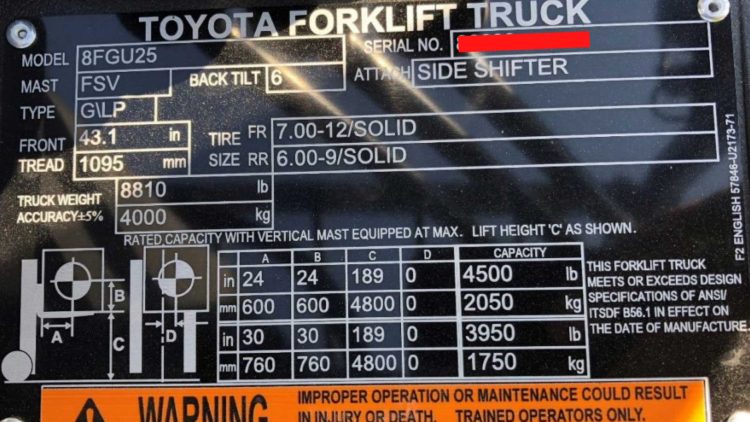
Every forklift has a small metal plate attached near the operator’s seat that most people never really look at until something goes wrong. That’s the data plate, the single most important safety reference on the machine.
This guide breaks down exactly what’s on a forklift data plate and how to read it, so you can operate your equipment safely and efficiently.
What Is a Forklift Data Plate?
A forklift data plate is often referred to as a capacity plate, but it tells so much more than capacity. It’s a manufacturer-installed nameplate that lists the specific truck’s rated capacity along with the conditions that capacity depends on.
A forklift data plate is not a generic spec sheet. The information on the plate is unique to the machine’s configuration. Two forklifts that look identical on the lot can have different capacity ratings if one has a taller mast, a side-shift attachment, or solid tires instead of pneumatic. The data plate tells you exactly what the forklift you’re using can lift under certain conditions.
By law and manufacturer requirement, the plate has to stay on the truck, stay legible, and match the truck’s current configuration. If the mast is swapped out or an attachment is added, an updated plate must be installed.
Why the Data Plate Matters
Ignoring your forklift data plate can seriously affect your machine’s stability. The forklift stability triangle balances the load, the counterweight, and the distance between them. Loading more weight or carrying the load further from the mast than outlined in the data plate can cause the truck to tip forward or sideways.
If a tip-over occurs, the data plate is the first thing an OSHA safety inspector will check. If it’s missing, damaged, or doesn’t match the truck’s current attachment setup, that’s a documented compliance gap before anyone even gets to what the operator did.
Reading the data plate correctly keeps the forklift’s stability triangle intact and your operation compliant.
10 Useful Things on a Forklift Data Plate (Besides Capacity)
Data plates vary slightly by manufacturer, but they all cover the same core information. Here’s what’s on them, listed in the order they’re most often presented:
1. Model Number
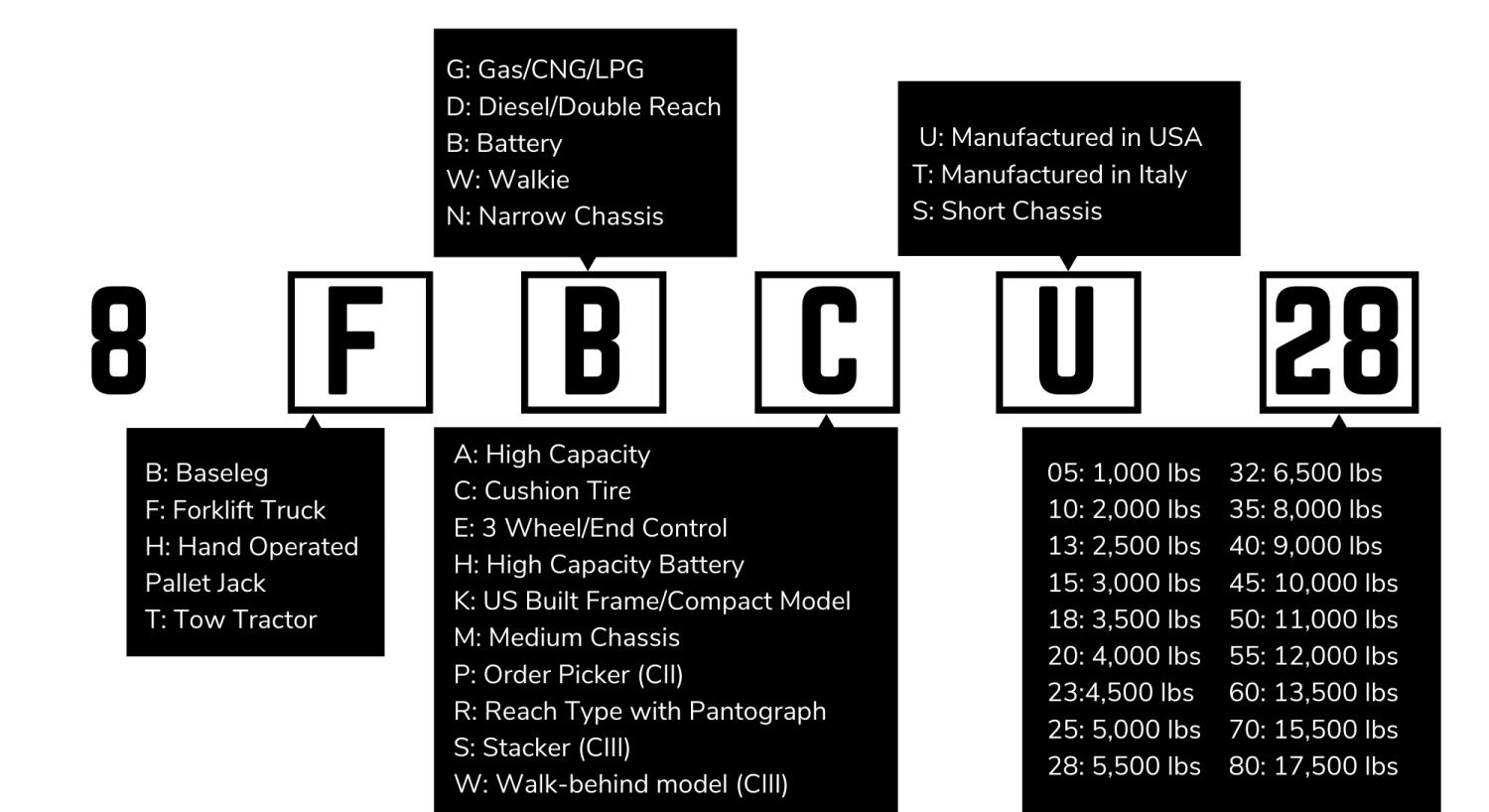
This is the first item listed on your data plate, and it tells you a lot about your specific machine. It’s a combination of 6 letters and numbers.
- First number: the series number or version of the model.
- First letter: indicates the category or forklift class. Learn more about the different forklift classes here.
- Second letter: indicates the drive type, such as gasoline, diesel, walkie, or narrow chassis.
- Third letter: indicates the special construction information.
- Fourth letter: indicates the manufacturing location or chassis size.
- Last number: indicates the chassis capacity.
If your forklift model number has an additional number before the 6-digit combination separated by a dash, that’s the optional power source.
2. Serial Number
The serial number tells technicians which parts are compatible with your machine. It might seem meaningless to you, but make sure it stays legible so your technicians can read it when it’s time for maintenance or repairs.
3. Mast Height
The mast height is indicated on the data plate under the model number as “mast.” There are a variety of mast types: single-stage, 2-stage, 3-stage, and quad mast. Each type varies in lift height and versatility.
4. Back Tilt
Directly next to the mast height, you’ll find the back tilt. This indicates the degrees that the back mast can tilt without the load slipping from the forks.
5. Attachment Information
If your truck has an attachment, you’ll find that information listed beside the back tilt box in a box labeled “attach.” The plate should show the derated capacity with that attachment installed, not just base capacity.
6. Fuel Type
The fuel type is labeled on the data plate as simply “type.” It’s relevant because the power source affects the counterweight placement and total truck weight, which factors into the stability calculation. The options include:
- E: electric
- LP: liquid propane
- G: gasoline
- DS: diesel
- CNG: compressed natural gas
7. Front Tread
The front tread, which indicates the machine width, is listed underneath the fuel type. This measurement helps operators and warehouse managers understand how much space the forklift will take up, and is crucial when thinking about things like aisle width.
8. Tire Type & Size
Next to the front tread, you’ll find the tire size and type for the front and back tires. It’s listed as width and rim diameter/tire type. “Solid” refers to solid pneumatic, “smooth” refers to solid cushion tires, and “treaded” refers to air-filled pneumatic.
9. Truck Weight
Beneath the front tread and tire size, you’ll see the truck weight listed in pounds and kilograms. This is the overall weight of the forklift without a load. (Don’t confuse this with the forklift capacity! They are not the same.)
10. Forklift Diagram Chart
The final item on your forklift data plate is the diagram and capacity chart. It’s arguably the most important data on the plate because it tells you how much your machine can lift at a certain mast height. The load capacity changes when the forklift load center changes, based on the following table measurements:
- Column A: horizontal load center
- Column B: vertical load center
- Column C: mast height*
- Column D: front tilt*
- Capacity: rated load capacity, relative to the load center
Understanding how these numbers work together can help you determine the maximum weight your forklift can safely lift.
*Not included on every forklift capacity chart.
How to Read a Forklift Capacity Chart
Reading your forklift capacity chart correctly helps prevent tip-overs and overloading accidents. The chart works like a lookup table or graph: one axis is the load center (or reach), the other is lift height, and the chart tells you the maximum weight the truck can safely lift at that specific combination.
To read one correctly:
- Find your actual load’s center of gravity. Measure from the front face of the forks to the middle of the load, not the edge. A load with weight concentrated toward the front sits at a different center than one that’s evenly distributed.
- Find the lift height you’ll actually be working at.
- Cross-reference those two numbers on the chart to get the truck’s real safe capacity for that specific pick.
Common Mistakes When Reading a Data Plate
The data plate is made up of so many different numbers and details that it can be easy to misread. Don’t make some of the most common mistakes:
- Assuming the plate’s number applies at any load center. It applies at the load center printed on the plate and drops from there.
- Ignoring the attachment derating, or using a truck with an attachment as if it were still rated at the base capacity.
- Confusing gross vehicle weight or shipping weight with the load capacity rating on the data plate. They are not the same figure.
- Using an old plate after a mast, tire, or attachment swap should have triggered a new rating.
- Estimating a load’s center of gravity by eye instead of measuring it, especially on irregular or palletized loads where the center isn’t obviously in the middle.
Forklift Weight Capacity: Why the Headline Number Isn’t the Full Story
The rated capacity most people quote — “it’s a 5,000-pound forklift” — is a shorthand for “5,000 pounds at 24 inches load center, forks at ground level, no attachment.” A change in any one of those conditions can make the real weight capacity meaningfully lower.
This is where a lot of overloading incidents start, and not because anyone ignored the plate on purpose. A load with an off-center or bulky shape can push the actual load center well past 24 inches without looking obviously oversized.
An attachment adds weight ahead of the forks, which itself acts like extending the load center even before the actual load is factored in. Raising the mast on certain trucks reduces the stable capacity at height, particularly outdoors or on uneven surfaces where lateral stability matters more.
The practical takeaway: treat the rated capacity as a moving number that decreases as the load center increases or the lift height increases. The number on the plate is the maximum weight under ideal, specified conditions, but doesn’t apply to every load type.
How Attachments & Load Center Change Rated Capacity
Attachments are one of the most common ways a truck’s real-world capacity ends up lower than its base rating. A fork positioner, clamp, rotator, or push-pull attachment adds its own weight in front of the mast. That weight must be accounted for in the truck’s stability budget before factoring in the load’s weight.
Manufacturers account for this with a derating: a reduced capacity rating specific to that attachment. The derating should be reflected on the data plate after the attachment is installed.
Load center works the same way in principle. Every additional inch a load’s center of gravity sits beyond the plate’s rated load center chips away at the truck’s safe capacity, even though the load itself might weigh well under the baseline number.
This is exactly why oversized, long, or awkwardly shaped loads need more caution than their weight alone would suggest. The effective load center, not just the scale weight, is what the truck’s stability math actually runs on.
What to Do If Your Data Plate Is Missing, Damaged, or Illegible
A data plate that’s faded, painted over, or missing entirely is a safety problem that shouldn’t be ignored. Take the truck out of service until it’s addressed.
If a plate is illegible or gone, don’t rely on memory, a similar-looking truck’s plate, or a generic spec sheet pulled from the internet. Contact the manufacturer or an authorized dealer with the truck’s serial number. They can issue a replacement plate matched to that exact unit’s original configuration.
If the truck has been modified with a different mast, tires, or attachment since it left the factory, flag that when requesting the replacement, since the new plate needs to reflect the truck’s current setup.
Frequently Asked Questions
It's the manufacturer-installed nameplate on a forklift that lists the truck's rated lifting capacity based on the conditions it depends on, including the load center, lift height, tire type, and attachment configuration.
Find the rated capacity and the load center it's paired with (usually 24 inches). That capacity only applies at that load center and at the lift heights and configuration listed on the plate, not automatically to every load you carry.
A capacity chart shows how a truck's safe lifting capacity changes across a range of load centers and lift heights. It's common on trucks like reach trucks and telehandlers where capacity varies continuously. A standard data plate usually shows one rated capacity at one load center.
Yes, attachments add weight ahead of the mast and reduce the truck's safe capacity below its base rating. The reduced number is called a derated capacity, and it should be reflected on an updated data plate once the attachment is installed.
Treat it as a stop-work issue for that truck. Contact the manufacturer or an authorized dealer with the serial number to get a replacement plate matched to the truck's actual configuration.
Ready for an Equipment Upgrade?
Industrial Forklift Truck can help. We work with industry-leading, professional forklift dealers to collect a huge inventory of forklifts for sale. Request upfront pricing and information on our dealer listings for free, helping you compare your options online before you buy.
Find the best deal on quality equipment in your area for free.